What this guide helps you do
Limit delivery to the places you serve, set a flat or weight-based fee, and configure a free-delivery threshold without changing pickup or dine-in behavior.
Before you start
Use the required store configuration access. Decide which country/cities/areas you deliver to and how much you charge. For weight-based retail delivery, set correct per-SKU gram weights first.
Where to find it
Partner → Delivery; on a phone More → Delivery. The Visual Editor and creation wizard can also show coverage in their full Fulfillment controls.
Step by step
-
Open Delivery and review Delivery areas. Turn on Limit delivery to specific areas if you want geographic restrictions.
-
Choose the delivery country. Where a city catalog is available, add each served city; a new city normally means whole-city coverage until you narrow it.
-
For a city with limited coverage, choose specific areas and add each covered area. Add a custom area through the offered control when it is not in the list.
-
Do not rely on the same area name in another city. The customer must choose the correct city/area pair.
-
Choose a flat delivery fee, or the Weight mode offered for product catalogs. Enter Delivery fee or Rate per kg in the store currency.
-
For weight mode, review each SKU's Weight in grams. An unset weight contributes zero grams; it can unintentionally reduce the fee.
-
Set Free delivery over if you want qualifying item subtotals to ship free. Zero means keep charging the configured delivery fee rather than activating a positive threshold.
-
Choose Save changes and wait for success. Method toggles and bank accounts remain on Fulfilments.
-
Test a covered and an uncovered customer address. For weight mode, compare a lightweight and a heavier representative basket without submitting a real order unless you intend to place it.
Understand the choices
-
Coverage determines whether an address qualifies; fees determine the amount. A free-delivery threshold does not expand the covered region.
-
A country without seeded city data uses whole-country behavior rather than offering an invented city list. Only use the controls shown.
-
Weight fee uses total SKU weight × rate per kg. The catalog stores grams, so 1,000 g equals 1 kg.
-
Free-delivery qualification uses the item subtotal according to the current pricing rules, not a text promise written in the hero.
-
Pickup/takeaway, reservations, and dine-in do not use a delivery fee simply because Delivery is configured.
Check the result
Covered addresses can use delivery; out-of-range pairs receive a clear checkout error. The fee and free threshold match the representative basket's values.
If something goes wrong
-
Customer picked another city: the area list resets to that city's areas; ask them to choose the correct pair.
-
Delivery fee unexpectedly zero: check free threshold and missing SKU weights.
-
Country has no city picker: it does not currently have a seeded city catalog; follow whole-country behavior.
-
Old hero says a different fee: update marketing copy separately; actual pricing comes from these saved settings.
Screenshots
These screenshots use demonstration data. Your names, amounts and available controls may differ. Current values on your own screen take priority.
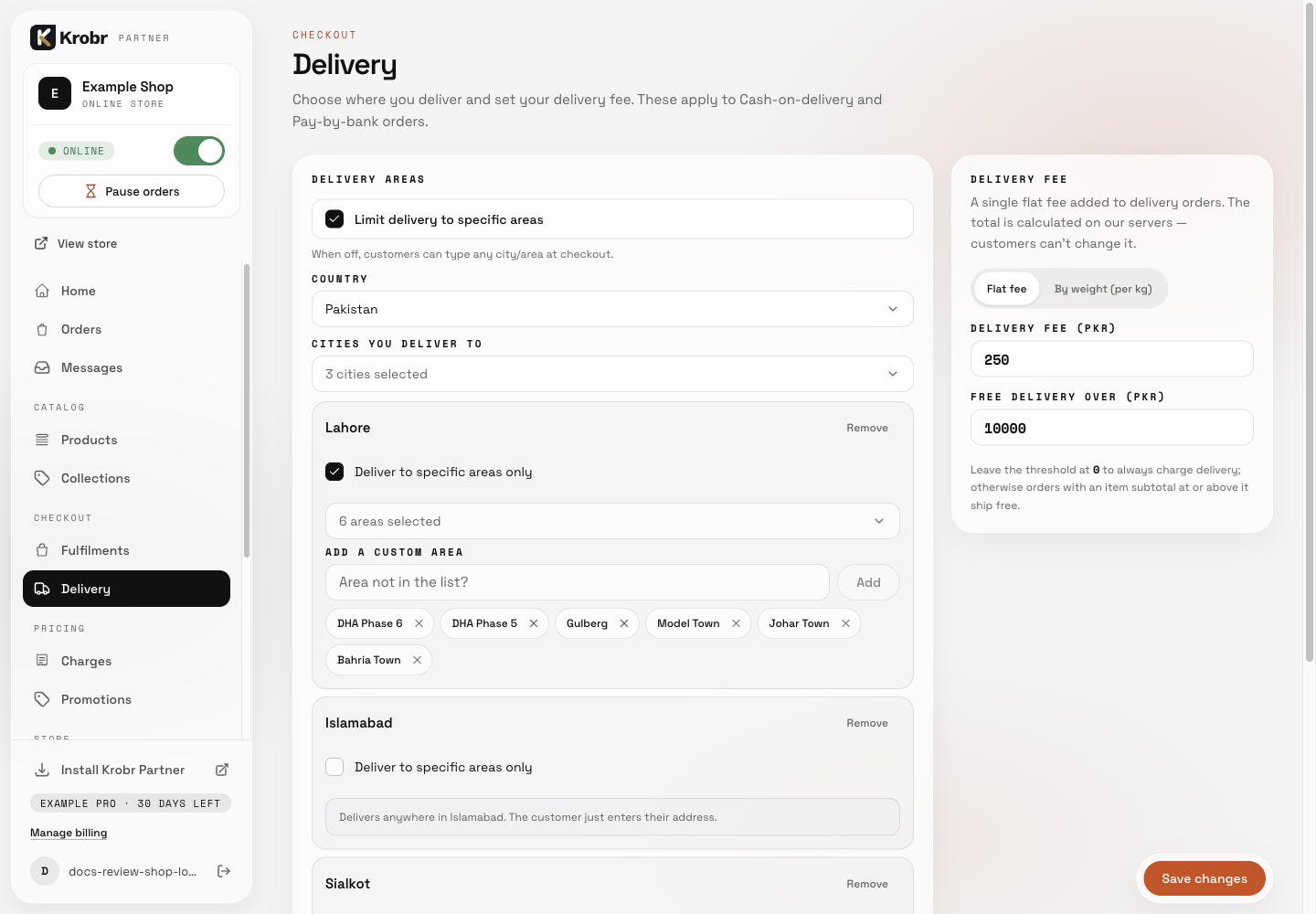
Set delivery cities, areas, fees, and weight-based shipping: find the controls in this example screen and follow the numbered instructions above. Retained English example from 13 October 2026. The Partner account area now also includes Language, which is not shown in this dated sidebar; follow the numbered steps for the current screen.