What this guide helps you do
Create size/color combinations, set each SKU's price and stock, apply bulk edits carefully, and understand when a product or one variant becomes sold out.
Before you start
Use Manage inventory access. Count available units and decide the price and shipping weight for each combination. A SKU is one specific combination, such as Large + Red.
Where to find it
Partner → Products → product editor → Inventory and SKUs. On a phone, the editable SKU grid may scroll inside its container; the surrounding page should remain readable.
Step by step
-
Open the product and decide whether it is a simple product or has choices. A simple product keeps one default SKU.
-
For choices, add a dimension such as Size and add values such as Small and Large. Add another dimension only when customers need it, such as Color.
-
Give each value a unique label. Add a color swatch only where it makes the option easier to recognize.
-
Review the generated SKU combinations. For each combination, enter its absolute Price, SKU code where offered, availability, and image/gallery.
-
Turn on Track stock for this product if stock should limit orders. Enter each SKU's Stock quantity.
-
Enter Weight in grams for weight-based delivery when used. A weight is a per-unit shipping input, not a price.
-
For bulk changes, select only the intended SKU rows, fill the bulk Price and/or Stock controls, and apply. Inspect every selected row before saving.
-
Save the product and wait for success. Test choosing different values on the public product page and confirm the displayed price and images swap correctly.
-
Check sold-out behavior: with tracking on, a zero-stock SKU cannot be ordered. If all SKUs have no stock, the product is out of stock.
-
After a new order, check the appropriate stock count in Partner. Do not use a presentation-only editor field as a second source of stock.
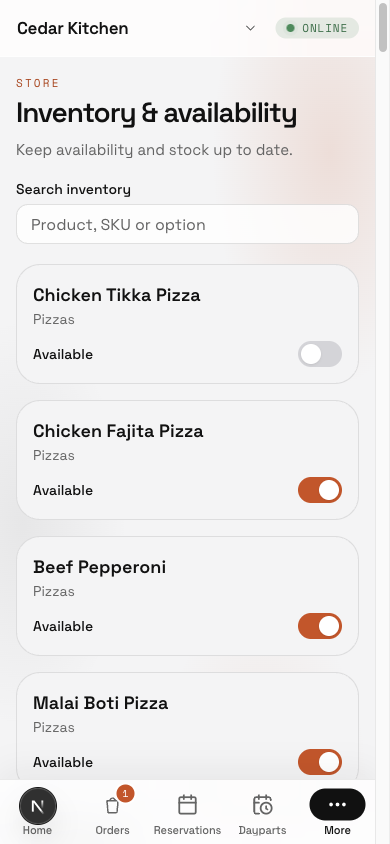
In Inventory, Search inventory finds a product, SKU or option. Product availability, each SKU’s availability, and Options & add-ons can be changed separately when Inventory is Manage. Snoozed items become available when their saved time expires.
Understand the choices
-
SKU price is a full price, not an extra added to the product price. The storefront may show a starting/from price across available SKUs.
-
Turning off inventory tracking removes stock-based order limits; it does not remove the separate availability/active switches.
-
Dimensions generate combinations. Removing or renaming them can change the matrix; check preserved prices and stock before saving.
-
Low-stock notifications reach the owner and active stock-capability members. A person without that access does not automatically receive stock operations alerts.
-
A variant gallery can override product photos; an empty variant gallery uses the intended product fallback.
Low-stock alerts use a fixed threshold of 5: a tracked SKU crossing from above 5 to 5 or less can notify the owner and eligible inventory staff. This screen has no per-SKU threshold setting.
Check the result
The SKU matrix matches the choices customers can make. Each selection has the right price, photo, weight, and available stock, and unavailable combinations cannot be ordered.
If something goes wrong
-
Duplicate dimension value: use a unique label within that dimension.
-
Save focuses a SKU error: correct that row's price, stock, weight, or image before retrying.
-
Unexpected sold out: check Track stock for this product, each SKU's stock/availability, and product/category availability.
-
Stock changed on the wrong rows: review the bulk selection before applying; a bulk edit uses the same entered value for the selected rows.
Support partner access
Inventory is also a separate store screen: open More → Inventory on a phone, choose Track stock, enter the SKU count and choose Save stock. Blank means untracked, while zero means no units. If stock changed meanwhile, refresh before retrying. Support partners need Inventory & availability Manage; Catalog Manage alone does not permit stock edits.
Screenshots
These screenshots use demonstration data. Your names, amounts and available controls may differ. Current values on your own screen take priority.
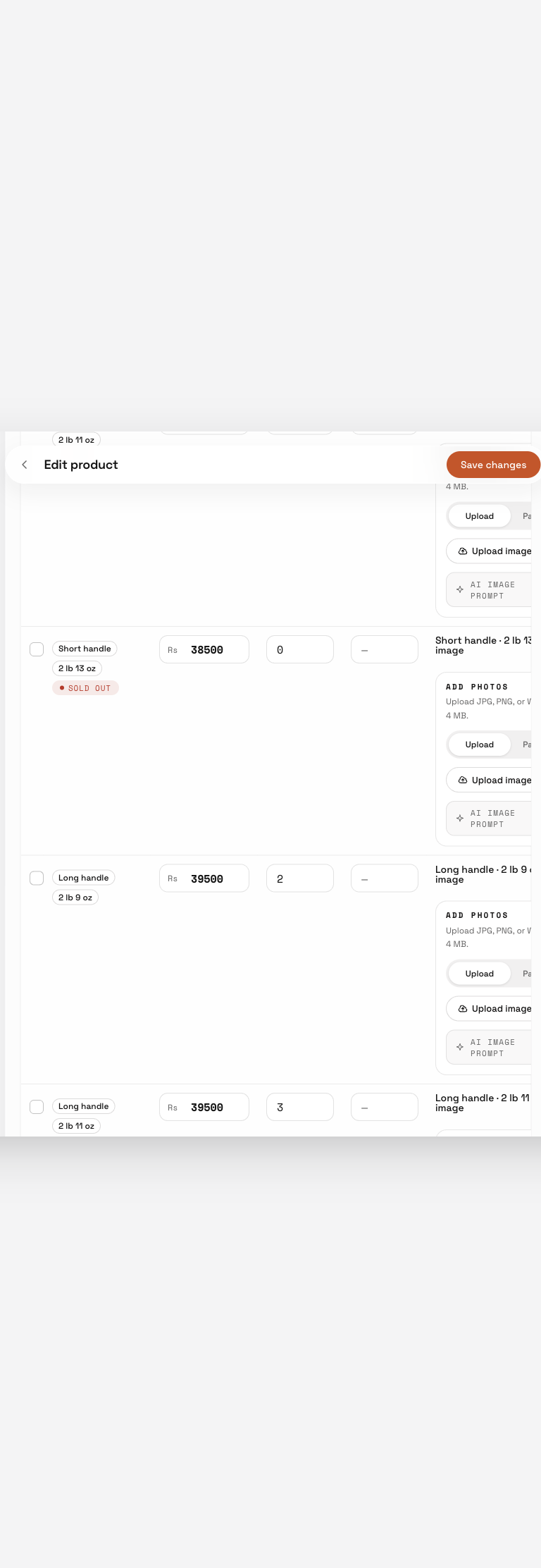
Partial SKU matrix example with prices, stock and photo slots. Scroll to view the remaining rows and columns; no successful save is shown.
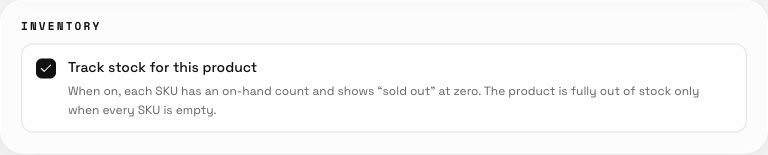
Track stock for this product enables stock tracking; review each resulting variant row.